II. New Recording Setup for Large Whisper Room
The new recording setup will let you connect up to 8 instruments for recording in the large whisper room and up to 4 headphones for live monitoring.
Setup Rack
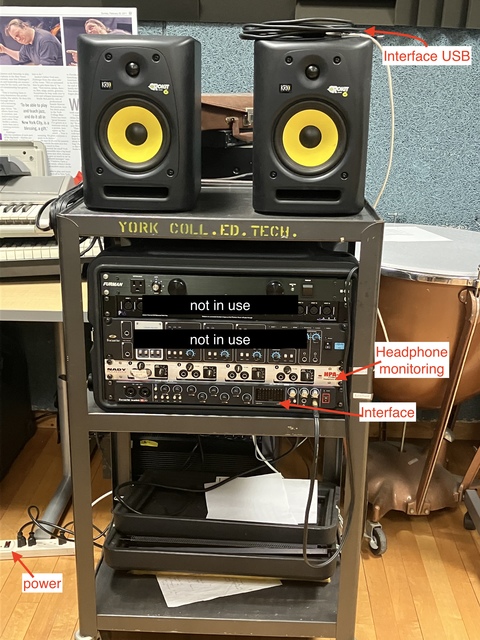
The top two units are not in use. Only use the headphone monitoring unit and the interface at the bottom of the rackmount.
How to use it?
1. Turn on power.
Multi-outlet power strip on the floor (left side).
2. Connect interface.
Plug USB cable (above speakers) into computer.
3. Plug in mics.
Inputs 1 & 2 are on the front of the interface.
4. Open DAW.
Select the audio interface as the input and output device.
5. Multi headphone monitoring.
Plug headphones into the monitoring splitter.
6. If needed, turn on speakers.
Do not bring microphones near the speakers — this will cause feedback.
7. When you're done.
Carefully disconnect the interface from your computer, turn off the speakers if you used them, and turn the power strip off. You do not need to turn off the interface separately.